What are your hours?
Our office is open Monday through Thursday from 8:30 a.m. until 5:30 p.m. and Friday from 8:30 a.m. until 4 p.m.
If you are planning to drop by, please fill out our contact form or call ahead at 803-749-8100.
What are your holiday hours?
Our holiday hours are updated regularly on Google and in the Southern Cloud. If we are closed and you need an immediate response from one of our team members, please call 803-749-8100 and press 0 to be directed to the person on call.
Where are you located?
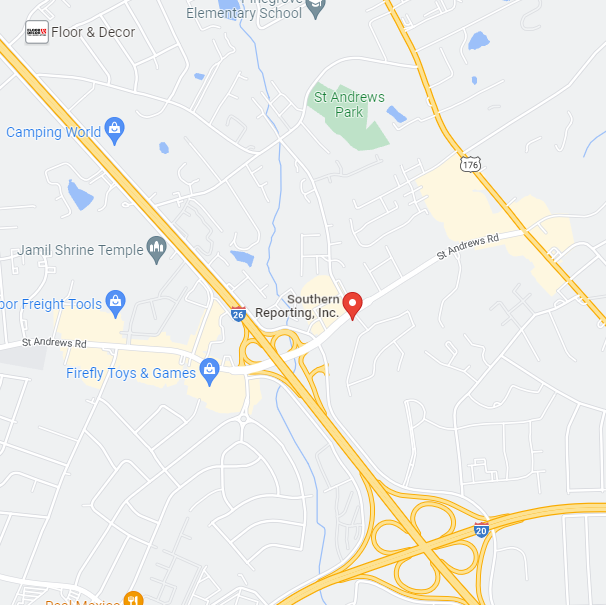
We have one physical office in Columbia, SC, located at 844 St. Andrews Rd, Suite A, Columbia SC 29210.
What is your mailing address? Where can I send a check?
Our mailing address is not a physical location. Mail can be sent to 701 Gervais St, Suite 150-285, Columbia, SC 29201.
If you need to pay an invoice, you can also pay it online through our Southern Cloud. If you are paying an invoice for someone else, email production@sourthernreporting.net.
Whom do you serve?
Attorneys, paralegals, and courts throughout the state of South Carolina, as well as some parts of North Carolina and Georgia.
Zoom Tips. How do I prepare for remote depositions?
To help the court reporter accurately identify speakers, we recommend joining with your own webcam or audio device (via laptop, tablet, phone, or desktop computer). If multiple participants are joining from the same room, you must use a single audio source to avoid feedback.
A stable internet connection is essential for video participation. If your connection is unstable, you can use your webcam for video, mute your microphone, and dial into Zoom via your cellphone for better audio. The phone number and instructions will be provided in your Zoom invite email.
Please be mindful of your microphone’s mute function and avoid talking over others. The court reporter needs to hear everyone clearly to ensure an accurate record, and overlapping conversations can cause audio to cut out during videoconferences, making it harder to capture everything correctly.
Would you like a tutorial? Check out How to Start a Zoom or Screen sharing exhibits during a Zoom
If you’d like to perform a test call, please email us at depos@southernreporting.net, at least one business day before your proceeding.
Can you cover out-of-state proceedings?
We have a wide network of Court Reporting firms. Simply let us know what you need, and we’ll handle the coordination for you. Fill out our Schedule Online form with your details.
Do you have a cancellation policy?
Yes. A cancellation fee may apply if the job cancels after 5 p.m. on the business day before the scheduled proceeding. If you need further clarification, let us know by filling out our contact form.
What are your rates?
Please fill out our contact form to request our rates.
What is your standard turnaround time?
Our standard turnaround time is ten (10) business days, excluding weekends and holidays.
Can I expedite my transcript?
Please fill out our contact form with the following information, and Scheduling will respond to you as quickly as they can:
- If this job is already scheduled with us, please provide the proceeding date and witness or case name.
- What date do you need your transcript by?
- Is an electronic version sufficient or do you need a hard copy?
- If you are the taking attorney, do you need the sealed original expedited too?
Can I secure an interpreter/translator through you?
Unfortunately, we do not secure interpreters/translators at this time. We recommend researching online resources.
Can I book a proceeding online?
Yes. If you are a returning client, please schedule in the Southern Cloud and follow these instructions: How to schedule a proceeding online.
If you are a new client, please fill out the form Schedule Online.
If you have trouble logging in, fill out our contact form or call 803-749-8100 and press 1.
How do I schedule a last-minute proceeding?
If your proceeding starts within 48 hours, email depos@southernreporting.net or call 803-749-8100 and press 1. If it’s after 5:30 p.m. Monday through Thursday or after 4 p.m. on Friday, please call 803-749-8100 and press 0 to be directed to the person on call.
How do I access my transcript, exhibits, invoice, etc., online?
You can access your transcripts, exhibits, or invoices on the Southern Cloud by logging in with your email address. If you don’t have a password, click Forgot Password, follow the instructions, and the system will generate an email link for you to set up a password. For a video tutorial see: How to Access Your Documents in the Southern Cloud.
If you have trouble logging in, email production@southernreporting.net or call 803-749-8100 and press 3.
How do I pay my invoice?
If you are paying an invoice on behalf of someone else, please email production@southernreporting.net or call 803.749.8100
If you are paying an invoice addressed to you, please log into the Southern Cloud and follow these instructions: How to Pay Your Invoice
What is the difference between a MP4 and a synched video?
An MP4 is a common video file format that works with a vast range of video players. Our synchronized videos are processed through Synchron. A synched video allows you to view the transcript and video at the same time and quickly edit portions of the video utilizing the transcript.
How do I access a video?
If you requested a hard copy of the video, it will be mailed to you when it is complete. If you requested a link, it will be emailed to you as soon as it’s available. If you ordered a link for a synced video, you will need to download and unzip all of the files before playing it.
Are you compliant regarding other state Privacy acts?
Effective 2024, several states have implemented privacy acts regarding the disclosure of your personal information. Pursuant to these states’ guidelines, Southern Reporting does not share your personal information. To make a request about your personal information, fill out our contact form. For more information on specific state privacy laws, visit the following sites:
Don’t see your question answered? Submit your question below.
For scheduling requests, please click here.
What are your hours?
Our office is open Monday through Thursday from 8:30 a.m. until 5:30 p.m. and Friday from 8:30 a.m. until 4 p.m.
If you are planning to drop by, please fill out our contact form or call ahead at 803-749-8100.
What are your holiday hours?
Our holiday hours are updated regularly on Google and in the Southern Cloud. If we are closed and you need an immediate response from one of our team members, please call 803-749-8100 and press 0 to be directed to the person on call.
Where are you located?
We have one physical office in Columbia, SC, located at 844 St. Andrews Rd, Suite A, Columbia SC 29210.
What is your mailing address? Where can I send a check?
Our mailing address is not a physical location. Mail can be sent to 701 Gervais St, Suite 150-285, Columbia, SC 29201.
If you need to pay an invoice, you can also pay it online through our Southern Cloud. If you are paying an invoice for someone else, email production@sourthernreporting.net.
Whom do you serve?
Attorneys, paralegals, and courts throughout the state of South Carolina, as well as some parts of North Carolina and Georgia.
Zoom Tips. How do I prepare for remote depositions?
To help the court reporter accurately identify speakers, we recommend joining with your own webcam or audio device (via laptop, tablet, phone, or desktop computer). If multiple participants are joining from the same room, you must use a single audio source to avoid feedback.
A stable internet connection is essential for video participation. If your connection is unstable, you can use your webcam for video, mute your microphone, and dial into Zoom via your cellphone for better audio. The phone number and instructions will be provided in your Zoom invite email.
Please be mindful of your microphone’s mute function and avoid talking over others. The court reporter needs to hear everyone clearly to ensure an accurate record, and overlapping conversations can cause audio to cut out during videoconferences, making it harder to capture everything correctly.
Would you like a tutorial? Check out How to Start a Zoom or Screen sharing exhibits during a Zoom
If you’d like to perform a test call, please email us at depos@southernreporting.net, at least one business day before your proceeding.
Can you cover out-of-state proceedings?
We have a wide network of Court Reporting firms. Simply let us know what you need, and we’ll handle the coordination for you. Fill out our Schedule Online form with your details.
Do you have a cancellation policy?
Yes. A cancellation fee may apply if the job cancels after 5 p.m. on the business day before the scheduled proceeding. If you need further clarification, let us know by filling out our contact form.
Can I get your rates? What are your rates?
Please fill out our contact form to request our rates.
What is your standard turnaround time?
Our standard turnaround time is ten (10) business days, excluding weekends and holidays.
Can I expedite my transcript?
Please email depos@southernreporting.net the following information, and Scheduling will respond to you as quickly as they can:
- If this job is already scheduled with us, please provide the proceeding date and witness or case name.
- What date do you need your transcript by?
- Is an electronic version sufficient or do you need a hard copy?
- If you are the taking attorney, do you need the sealed original expedited too?
Can I secure an interpreter/translator through you?
Unfortunately, we do not secure interpreters/translators at this time. We recommend researching online resources.
Can I book a proceeding online?
Yes. If you are a returning client, please schedule in the Southern Cloud and follow these instructions: How to schedule a proceeding online.
If you are a new client, please fill out the form Schedule Online.
If you have trouble logging in, fill out our contact form or call 803-749-8100 and press 1.
How do I schedule a last-minute proceeding?
If your proceeding starts within 48 hours, email depos@southernreporting.net or call 803-749-8100 and press 1. If it’s after 5:30 p.m. Monday through Thursday or after 4 p.m. on Friday, please call 803-749-8100 and press 0 to be directed to the person on call.
How do I access my transcript, exhibits, invoice, etc., online?
You can access your transcripts, exhibits, or invoices on the Southern Cloud by logging in with your email address. If you don’t have a password, click Forgot Password, follow the instructions, and the system will generate an email link for you to set up a password. For a video tutorial see: How to Access Your Documents in the Southern Cloud.
If you have trouble logging in, fill out our contact form or call 803-749-8100 and press 3.
How do I pay my invoice?
If you are paying an invoice on behalf of someone else, please use our guest portal.
If you are paying an invoice addressed to you, please log into the Southern Cloud and follow these instructions: How to Pay Your Invoice
What is the difference between a MP4 and a synched video?
An MP4 is a common video file format that works with a vast range of video players. Our synchronized videos are processed through Synchron. A synched video allows you to view the transcript and video at the same time and quickly edit portions of the video utilizing the transcript.
How do I access a video?
If you requested a hard copy of the video, it will be mailed to you when it is complete. If you requested a link, it will be emailed to you as soon as it’s available. If you ordered a link for a synced video, you will need to download and unzip all of the files before playing it.
Are you compliant regarding other state Privacy acts?
Effective 2024, several states have implemented privacy acts regarding the disclosure of your personal information. Pursuant to these states’ guidelines, Southern Reporting does not share your personal information. To make a request about your personal information, fill out our contact form. For more information on specific state privacy laws, visit the following sites: